
Modernizing a legacy B2B
broker platform operating
at $300M+ GMV
Role
Sole Product Designer
Team
1 Designer; 2 Engineers; no PM
Duration
Apr 2024 - Dec 2024
(01)
Overview
Stage Front Portal is a live operational platform used by ticket brokers across the U.S. to manage inventory, pricing, and marketplace distribution, processing $300M+ GMV annually. Originally built in 2011 it had grown over two decades into a system of 120+ features that brokers depended on daily to make fast, high-stakes pricing decisions.
When I joined the project, the platform worked, but it was slowing brokers down in a market where speed is money. My job was to modernize it without breaking the workflows that experienced brokers had built
their businesses around.
(02)
Problem
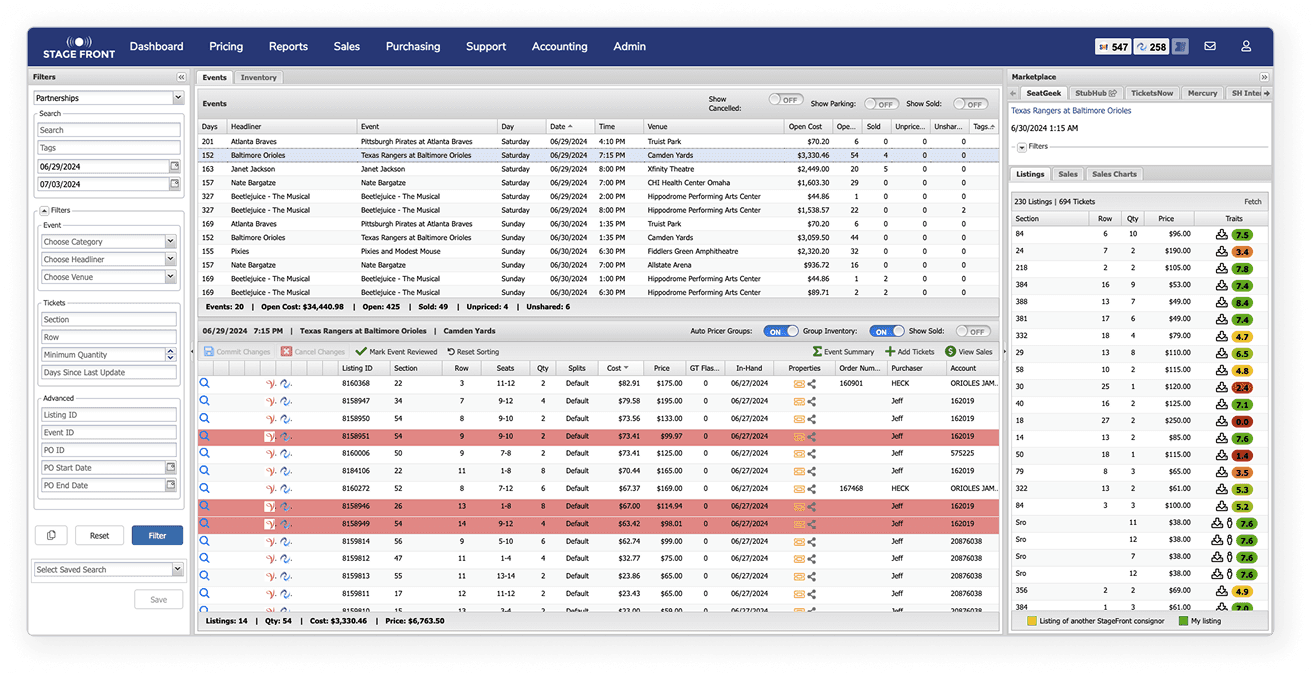
The platform had evolved for over a decade without structural redesign. Through broker interviews and workflow mapping, several patterns emerged: fragmented workflows, duplicate inventory views, and hidden interactions that kept powerful features undiscovered.
The Autopricer, the platform's most valuable time-saving tool, had such low visibility that some brokers didn't know it existed despite years of daily use. In a market where pricing decisions happen in real time, these weren't just usability issues. They were directly impacting broker revenue.
(03)
Constraints
Backend could not be touched
All workflow improvements had to remain compatible with existing system logic. No structural changes, no new data models.
Live platform, no safety net
Brokers were managing real transactions at significant daily volume. Any change carried direct operational risk.
Minimal team, full ownership
For the first six months, just me and two developers.
No PM, no researcher.
Hard conference deadline
Within three months we needed something ready for WTC Nashville, in front of active brokers who knew the product deeply.
These constraints weren't obstacles. They were the design brief.
(04)
Approach
From the beginning I made a deliberate choice:
this wouldn't be a UI refresh. The real issue was that the platform had no hierarchy, everything was equally visible, which meant nothing was truly findable.
Broker interviews confirmed this immediately. Watching brokers use the right-click context menu was the turning point, it had 25+ options, but brokers used only a handful. Not because the others weren't valuable, but because there was no way to know what was important versus situational versus rarely needed. The job was to create hierarchy where none existed.
The conference deadline forced a hard prioritization call. With three user groups and three months, I focused entirely on brokers, the primary revenue driver. Showing one complete, polished core flow for the people who mattered most to the business was the right call.
Everything else was sequenced, not cut.
(05)
Key Improvements:
Main workspace redesign
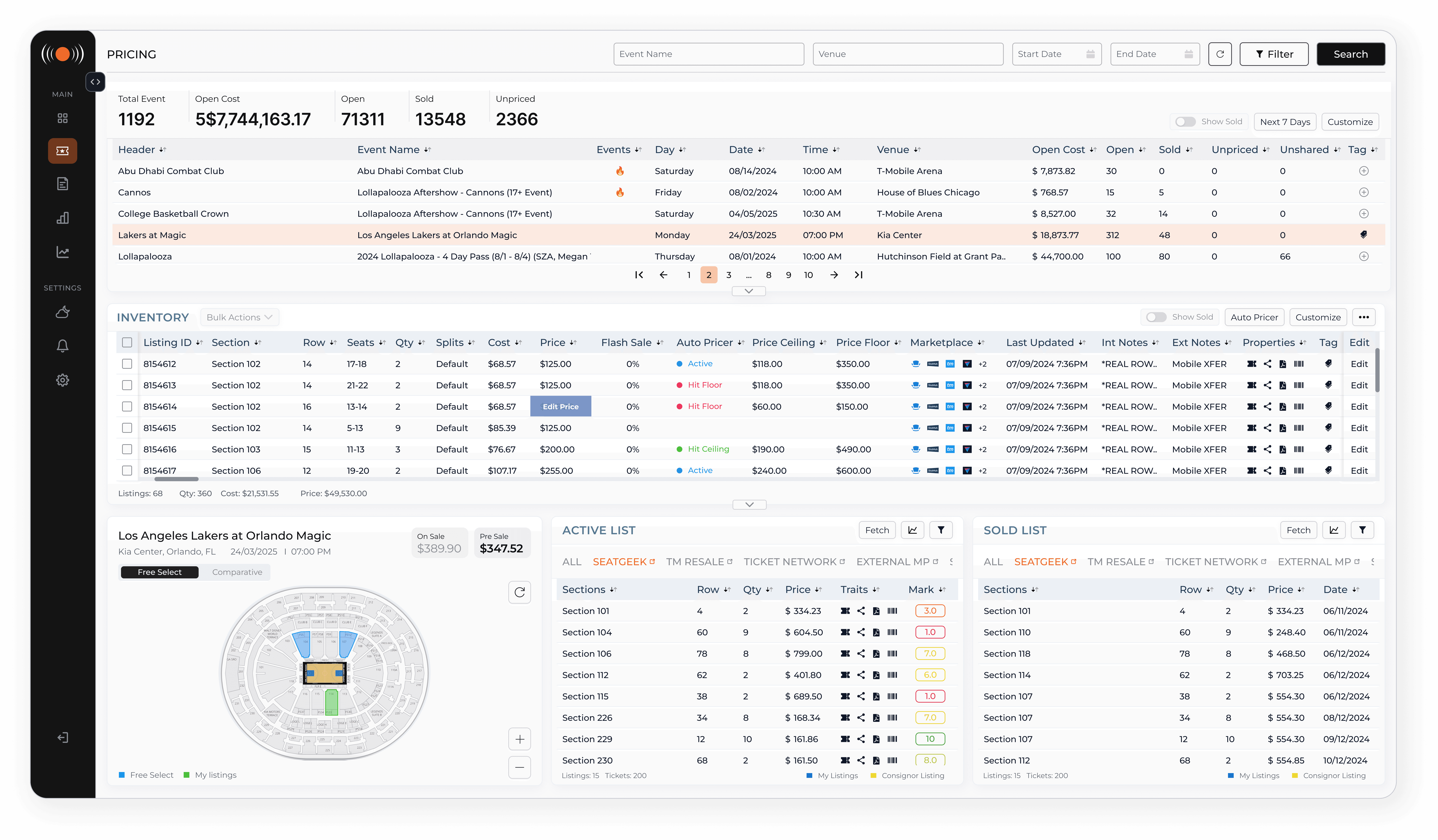
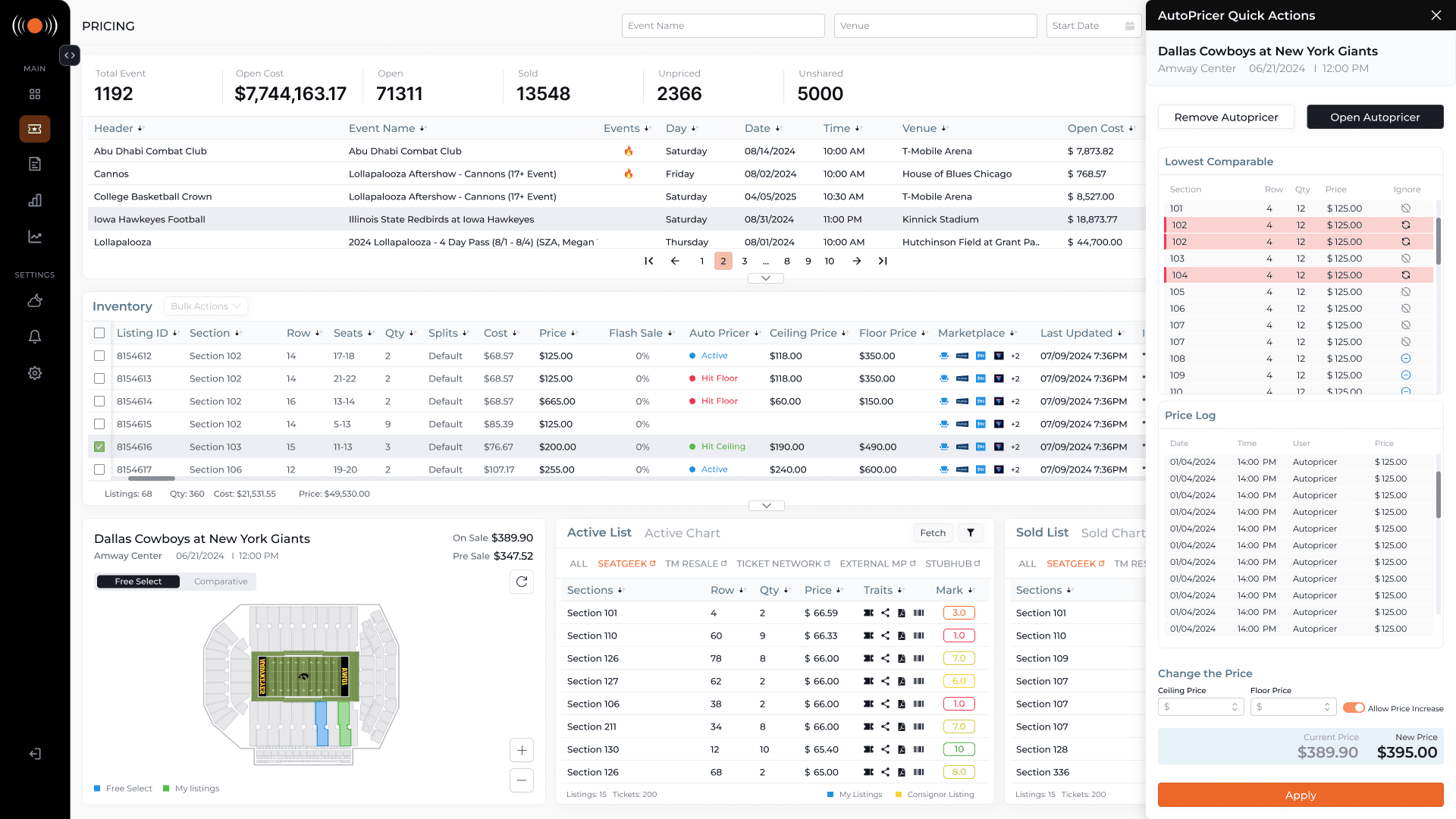
The pricing page is where brokers live, scanning inventory, adjusting prices, responding to market changes in real time. The original design had no spatial hierarchy: key metrics buried in footers, a single cluttered table mixing active listings, sold listings, and market data together.
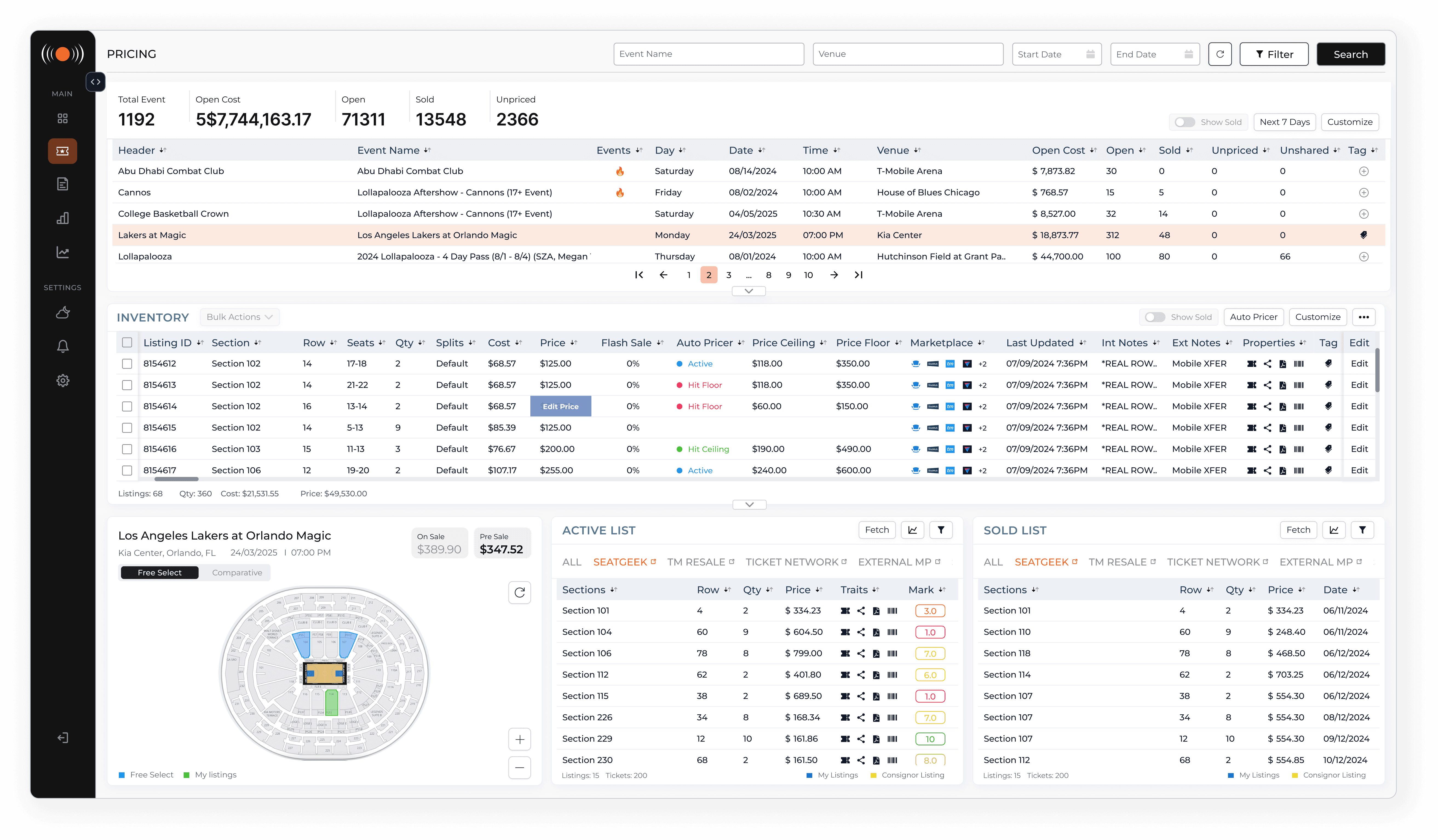
I restructured the entire page into three deliberate rows, each with a single job. Event selection at the top. Inventory management in the middle, duplicates removed, primary actions like Bulk Actions and Autopricer surfaced in the table header, and an Edit button on every row replacing hidden right-click interactions.
At the bottom, a single tabbed table became three parallel components: a map view, an active listings panel, and a sold listings panel.
The map was a new feature, brokers had no way to visualize competitive position spatially. Both listing panels are filterable by marketplace and include a chart view. The chart view existed before but had never worked. We made it work.
Listing Management
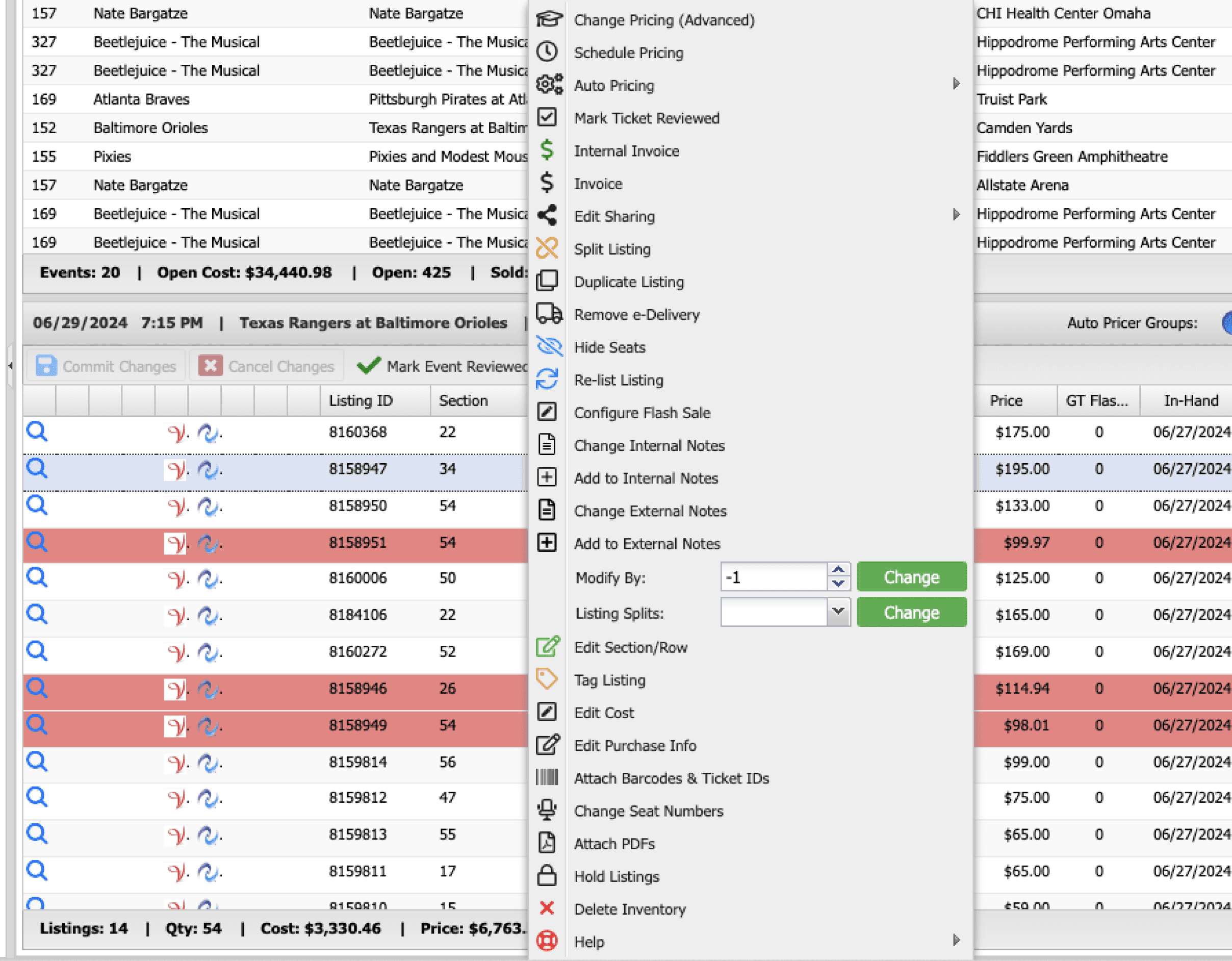
Editing a listing originally meant right-clicking, navigating a 25+ option context menu, and working through pop-ups inside pop-ups.
No hierarchy, no clarity.
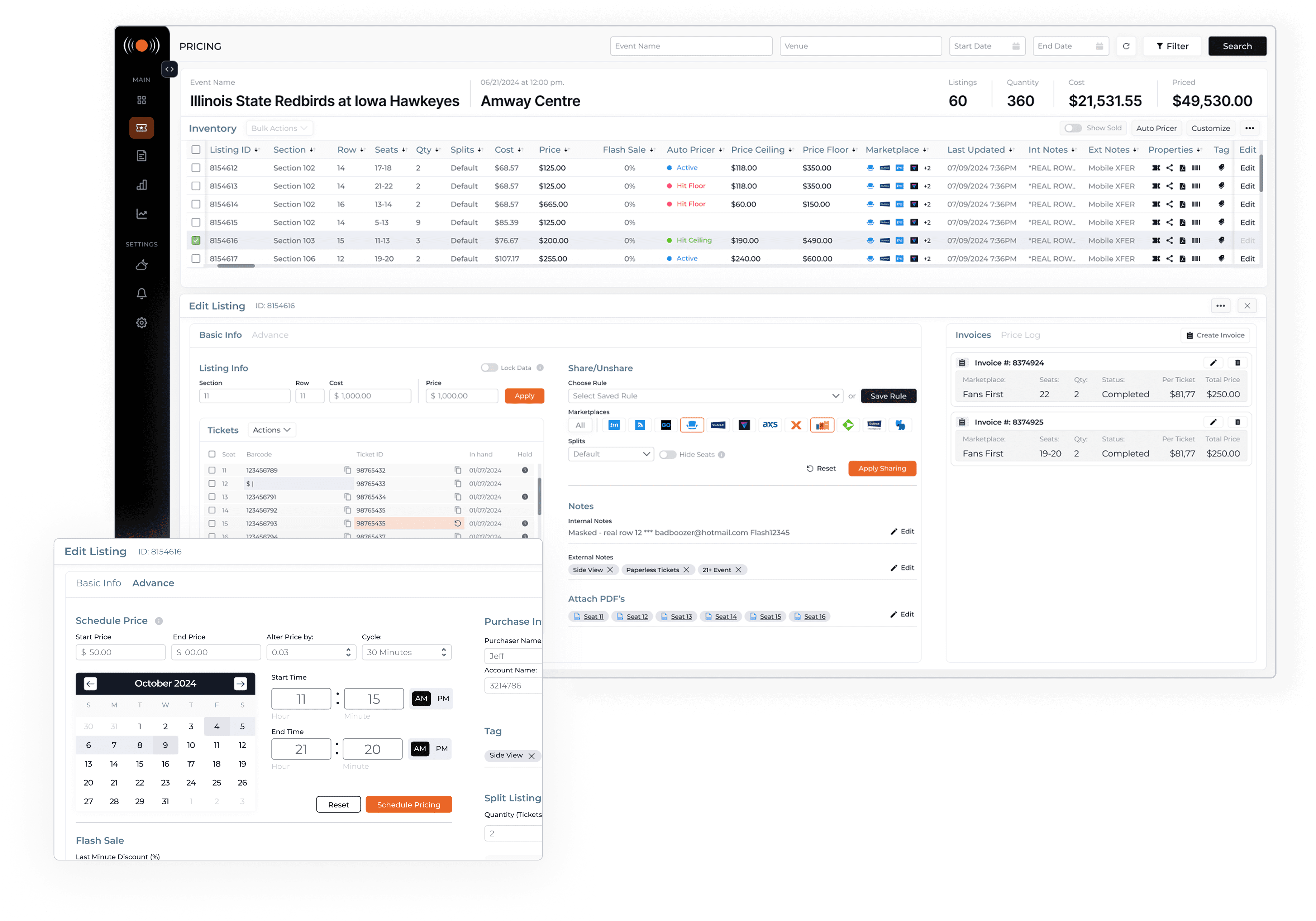
When a broker clicks Edit, the workspace transitions into a dedicated inline editing environment, no modals, no lost context.
Actions are organized into two tabs:
Basic Info for everyday tasks
Advance for scheduled pricing and flash sales.
The older brokers who were initially most resistant came around fastest on this feature.
Autopricer
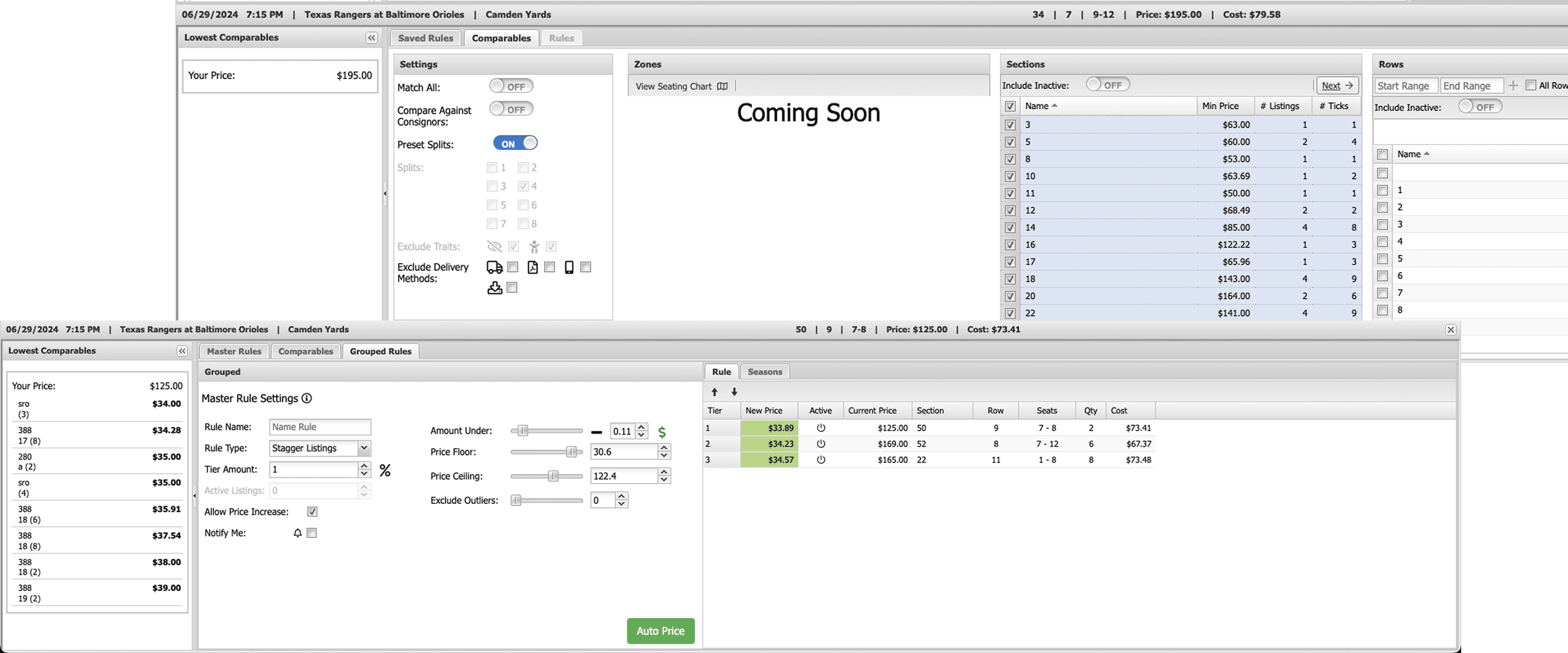
Autopricer could automatically adjust pricing based on market comparables, price floors, and ceilings. Most brokers either didn't know it existed or had given up on it, access required four to five steps buried in nested right-click submenus.
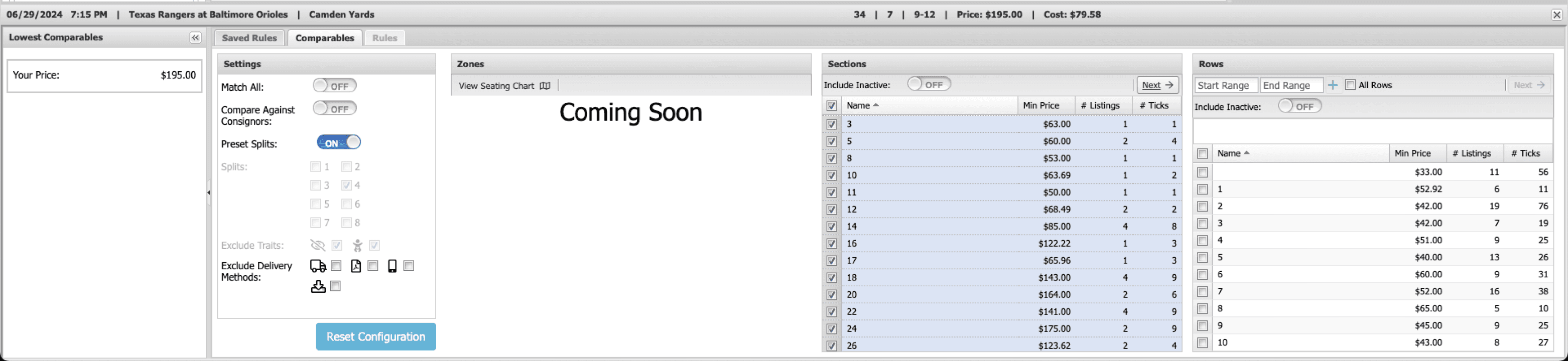
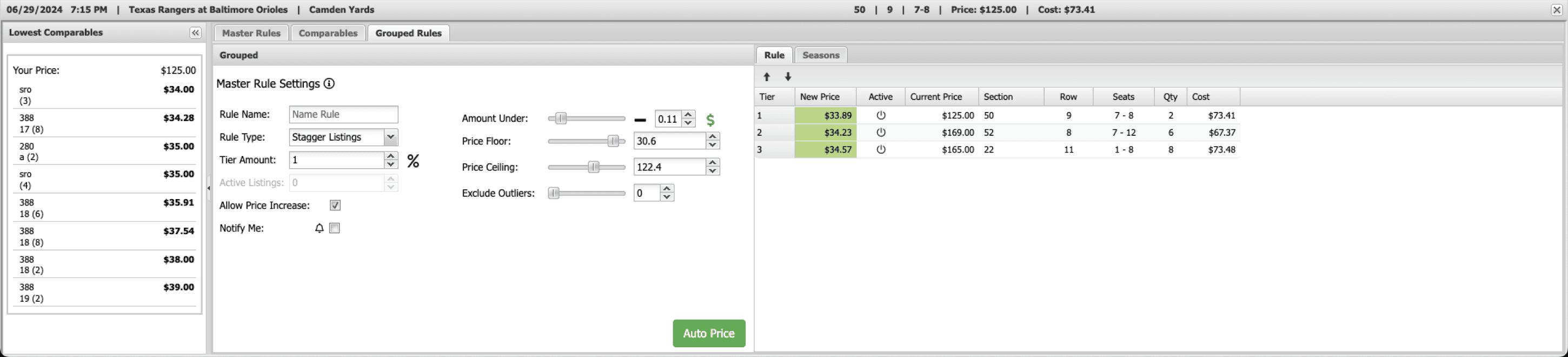
The redesign surfaced Autopricer as a primary action.
I added a clear Autopricer CTA directly in the inventory header, always visible, one click away. Clicking it opens a Quick Actions panel on the right side of the screen.
For brokers who already have Autopricer configured, this panel shows their current settings and lets them make immediate adjustments without leaving the workspace.
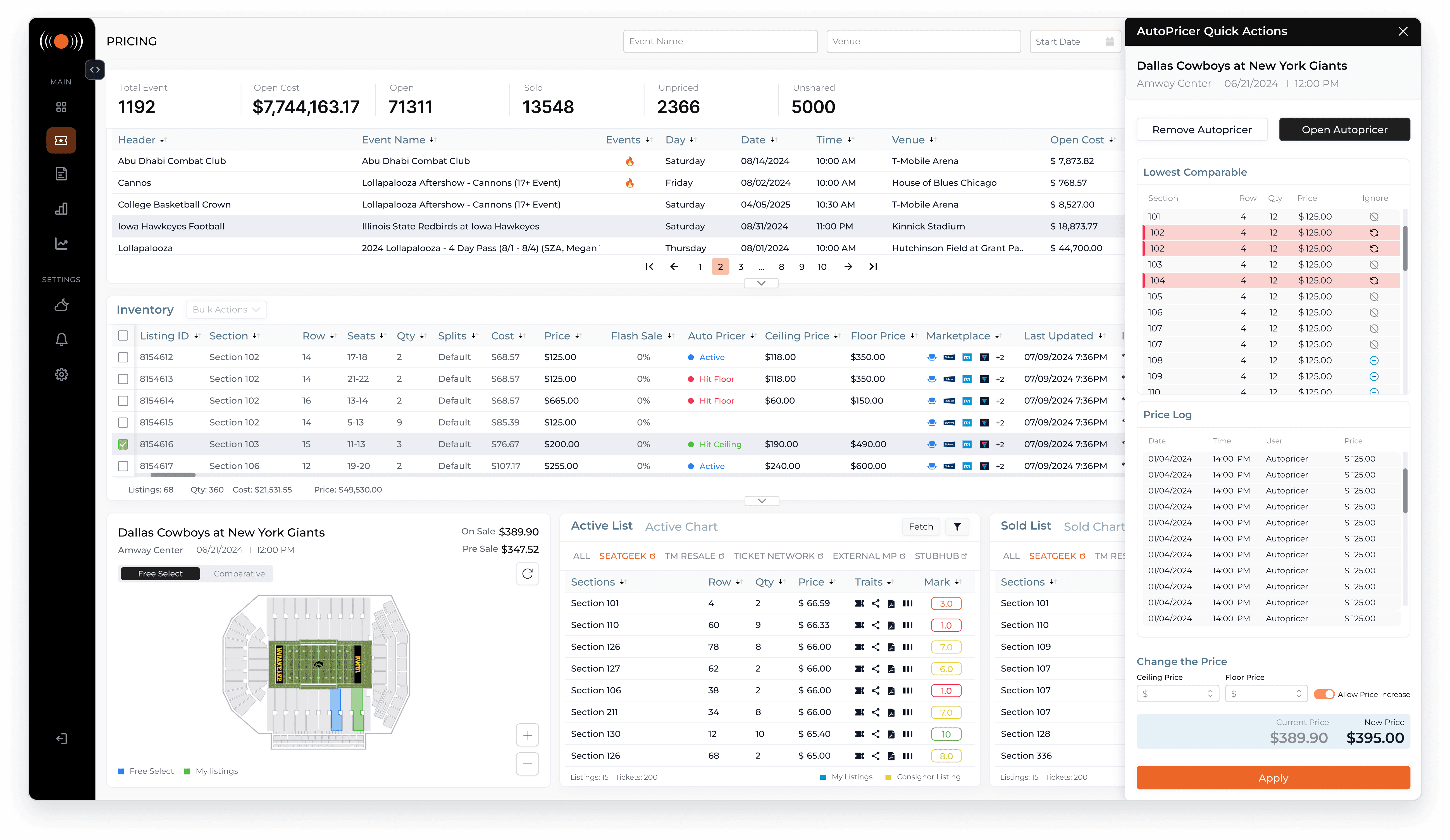
For brokers who haven't set it up yet, a single button:
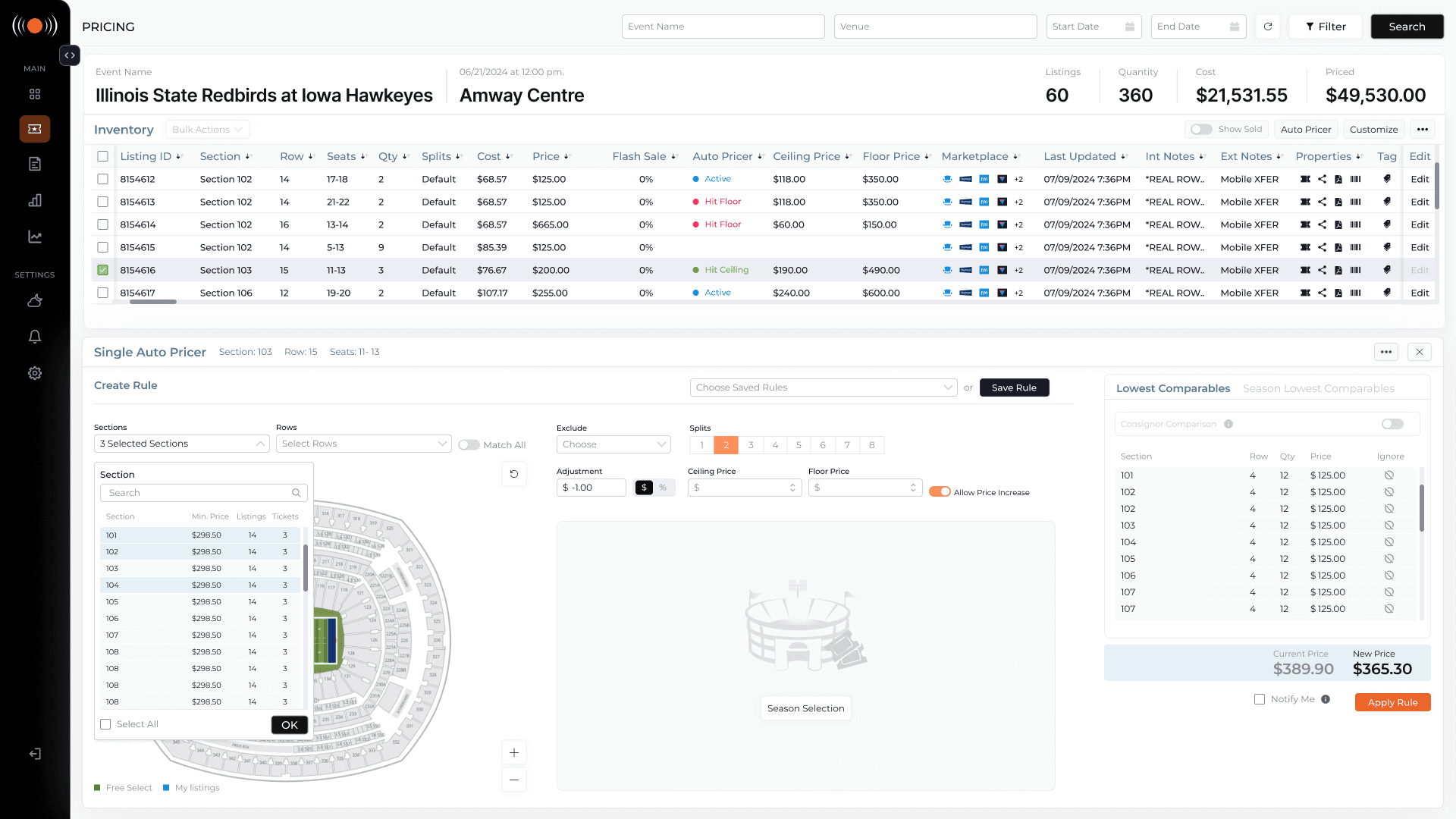
Open Autopricer, takes them into the full configuration flow, where they can set pricing rules, define price floors and ceilings, select sections using an integrated map, and see a live comparison between their current price and the new proposed
price before applying.
The design handles both single listing and grouped Autopricer from the same entry point, with the interface adapting based on what the broker has selected in the inventory table.
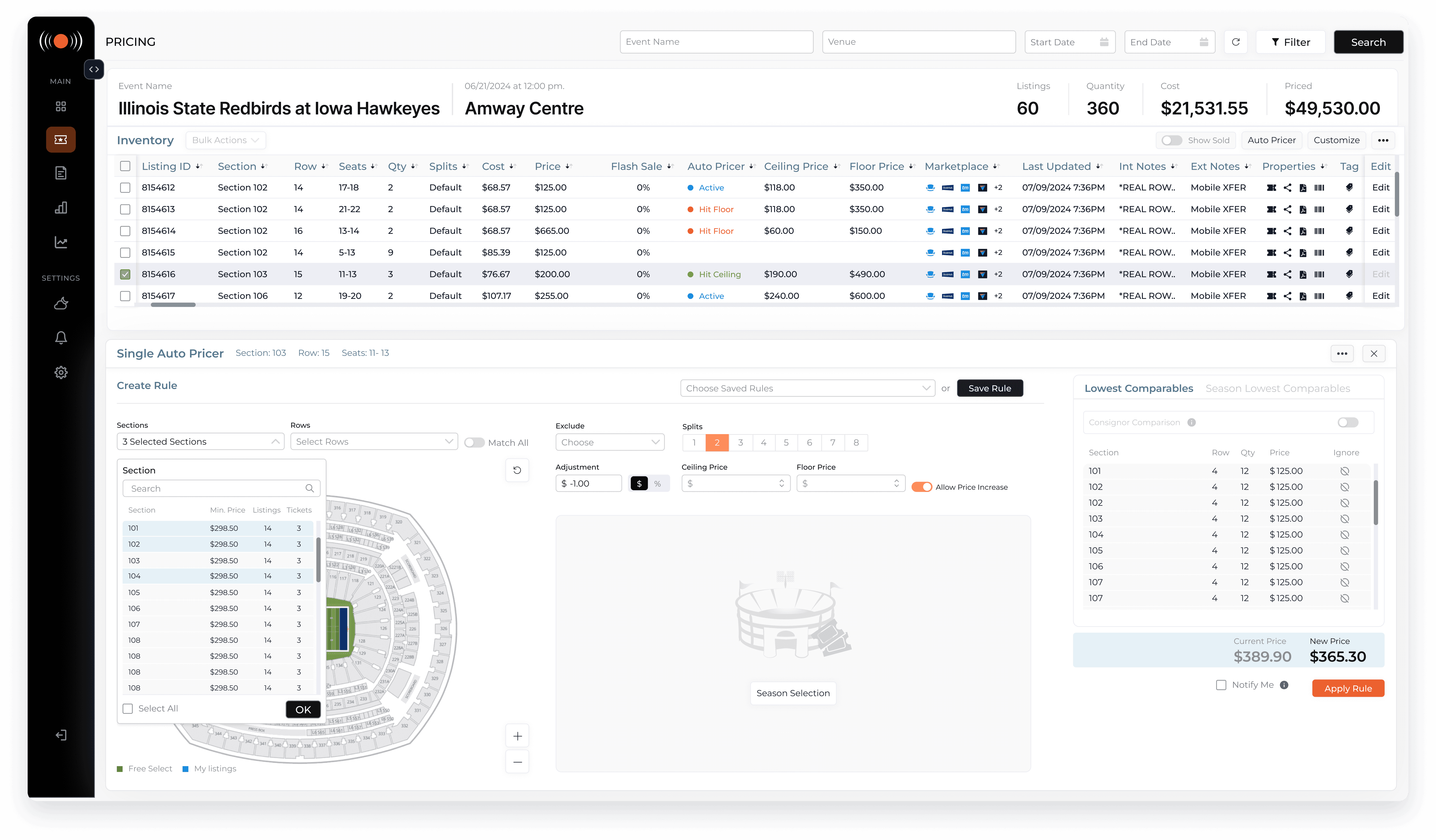
A feature that required institutional knowledge to find now has a front door.
Brokers who had never used Autopricer could discover and configure it in a single session.
(06)
Validation & Release
The redesigned interface was introduced at WTC Nashville, in front of active brokers who knew the platform deeply. Real users, real feedback, immediate. That exposure shaped refinements before broader release.
A controlled beta with 20 pilot brokers followed. Workflows were observed in actual daily use, not test conditions. The older brokers who had been most resistant to change were among the most telling validators, their comfort with the new interface by the end of beta was a stronger signal than any usability score.
(07)
Outcome
Autopricer adoption
Increased significantly among brokers who had never used the feature, becoming discoverable and configured within a single session for the first time.
Core task time reduced by ~60%
Pricing and listing management workflows that previously required multiple steps and nested popups now complete in a single structured environment, measured via Hotjar and Mixpanel.
Platform engagement up ~15%
Tracked in the first 6 months following beta rollout, among a user base that was actively resistant to change.
Design system established
A shared component library reduced UI inconsistency and accelerated feature development across subsequent releases.
The redesign improved operational clarity across a highly complex broker platform while preserving workflows users had relied on for years.
View My Work
Ticketing
Multi Session Browser
Ticketing
Stage Front Portal
Retail Technology
Fuel Retail & POS Platform
Ticketing
Chrome Extension
Fintech
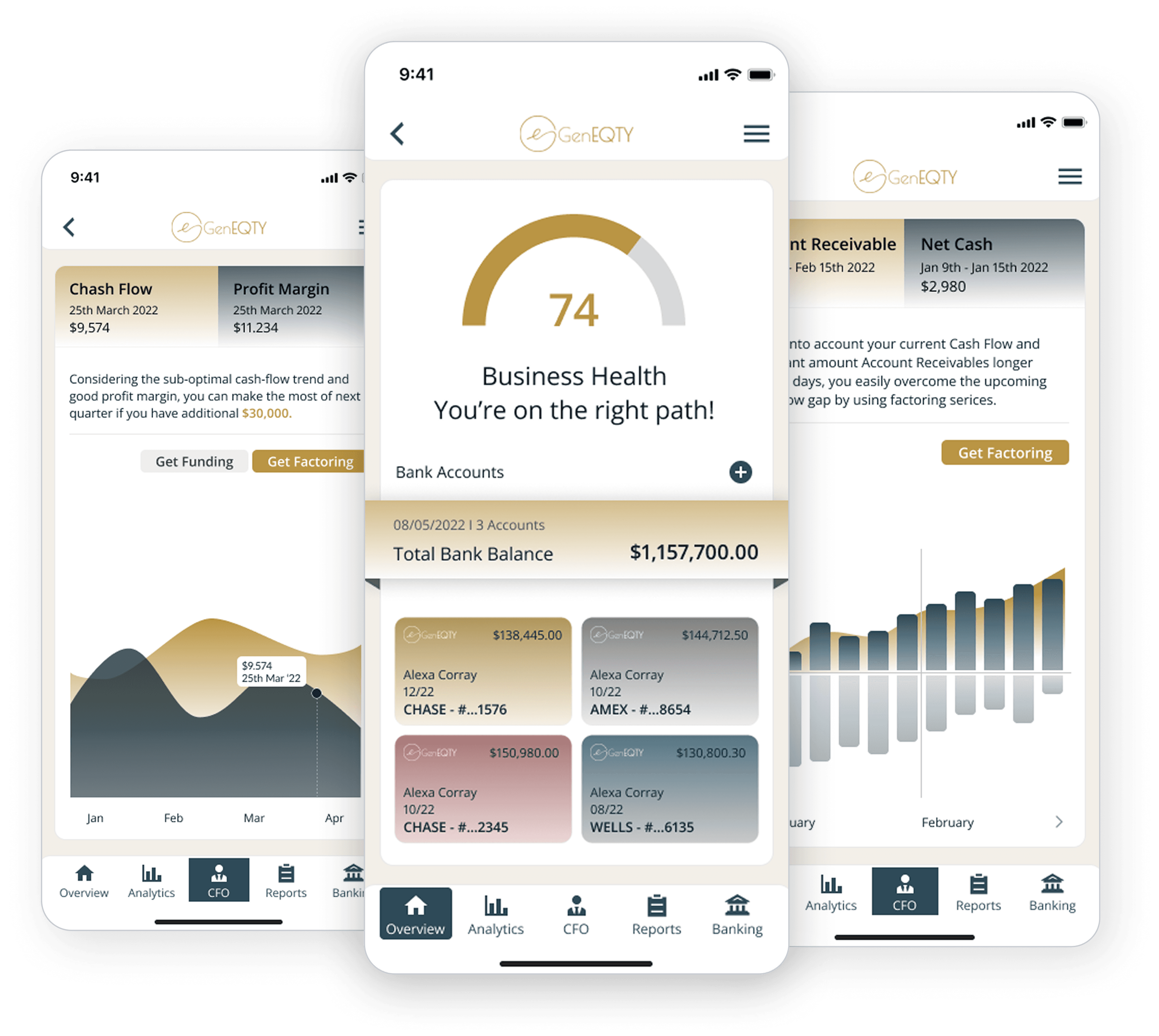
GenEQTY - mobile app
Non-Profit
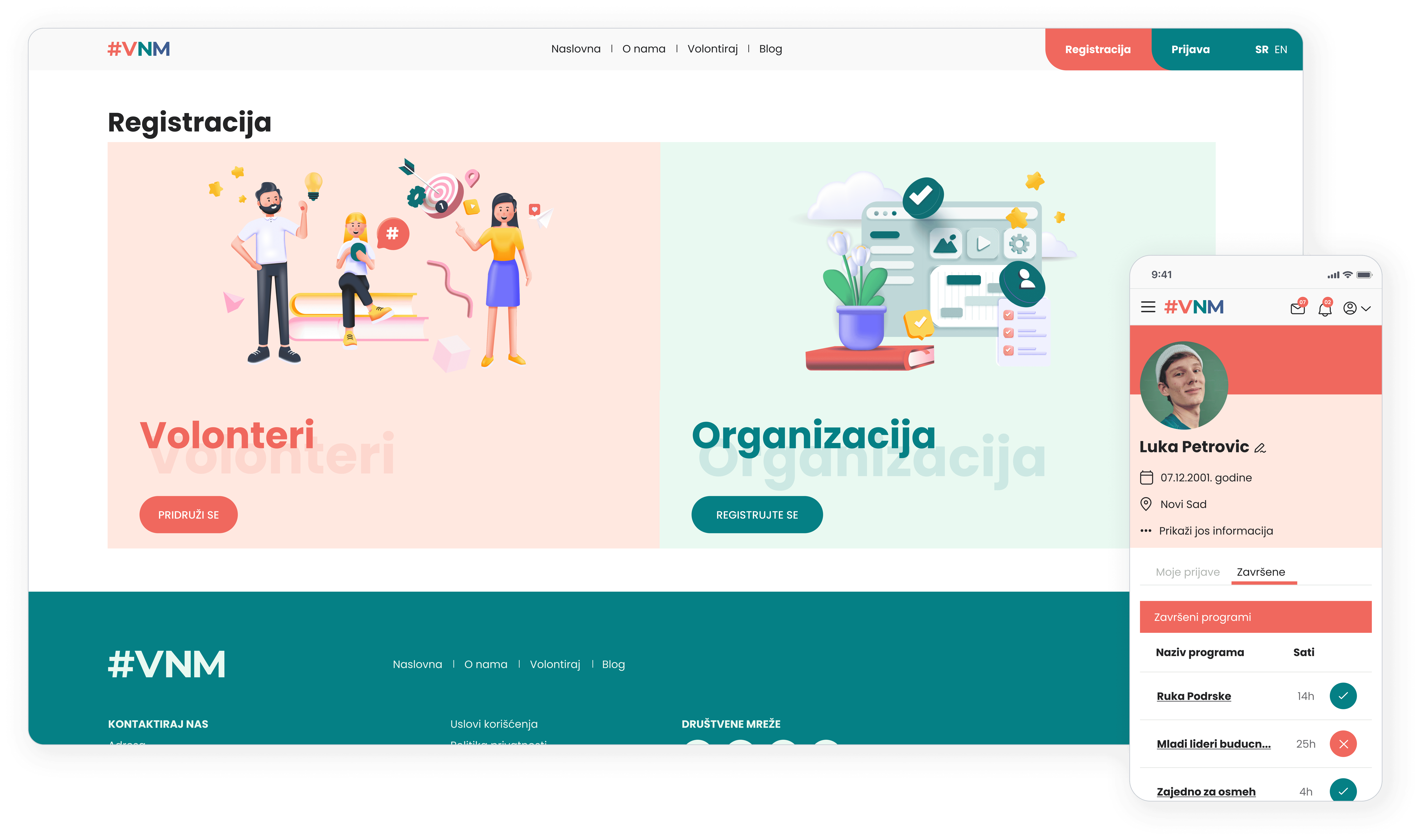
UNICEF - Volunteering Platform
Sports and Entertainment
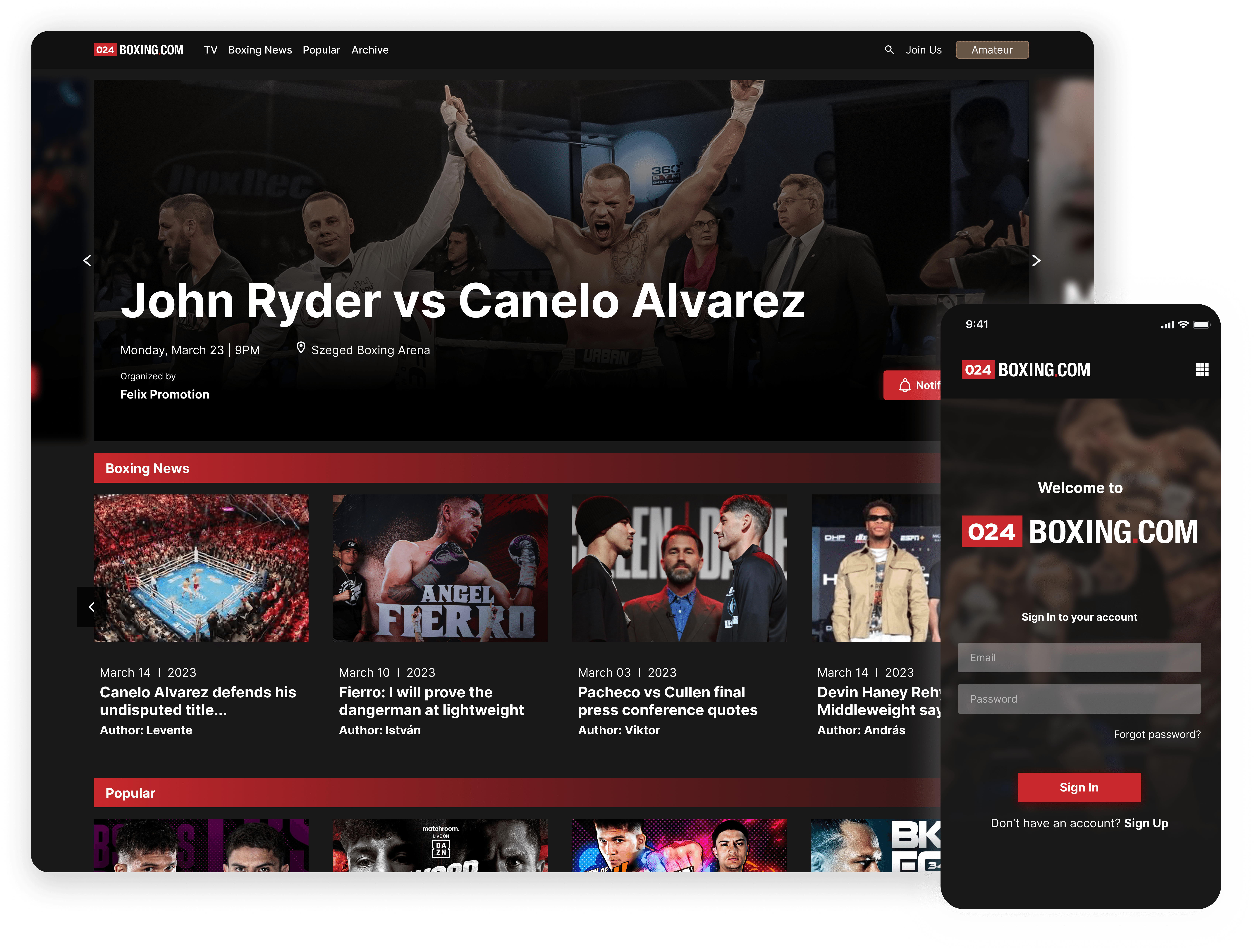
024 Boxing Com
Modernizing a legacy B2B
broker platform operating
at $300M+ GMV
Role
Sole Product Designer
Team
1 Designer; 2 Engineers; no PM
Duration
Apr 2024 - Dec 2024
Modernizing a legacy B2B
broker platform operating
at $300M+ GMV
Role
Sole Product Designer
Team
1 Designer; 2 Engineers; no PM
Duration
Apr 2024 - Dec 2024
(01)
Overview
Stage Front Portal is a live operational platform used by ticket brokers across the U.S. to manage inventory, pricing, and marketplace distribution, processing $300M+ GMV annually. Originally built in 2011 it had grown over two decades into a system of 120+ features that brokers depended on daily to make fast, high-stakes pricing decisions.
When I joined the project, the platform worked, but it was slowing brokers down in a market where speed is money. My job was to modernize it without breaking the workflows that experienced brokers had built
their businesses around.
(02)
Problem
The platform had evolved for over a decade without structural redesign. Through broker interviews and workflow mapping, several patterns emerged: fragmented workflows, duplicate inventory views, and hidden interactions that kept powerful features undiscovered.
The Autopricer, the platform's most valuable time-saving tool, had such low visibility that some brokers didn't know it existed despite years of daily use. In a market where pricing decisions happen in real time, these weren't just usability issues. They were directly impacting broker revenue.
(04)
Approach
From the beginning I made a deliberate choice: this wouldn't be a UI refresh. The real issue was that the platform had no hierarchy, everything was equally visible, which meant nothing was truly findable.
Broker interviews confirmed this immediately. Watching brokers use the right-click context menu was the turning point, it had 25+ options, but brokers used only a handful. Not because the others weren't valuable, but because there was no way to know what was important versus situational versus rarely needed. The job was to create hierarchy where none existed.
The conference deadline forced a hard prioritization call. With three user groups and three months, I focused entirely on brokers, the primary revenue driver. Showing one complete, polished core flow for the people who mattered most to the business was the right call.
Everything else was sequenced, not cut.
(03)
Constraints
Backend could not be touched
All workflow improvements had to remain compatible with existing system logic. No structural changes, no new data models.
Backend could not be touched
All workflow improvements had to remain compatible with existing system logic. No structural changes, no new data models.
Live platform, no safety net
Brokers were managing real transactions at significant daily volume. Any change carried direct operational risk.
Live platform, no safety net
Brokers were managing real transactions at significant daily volume. Any change carried direct operational risk.
Minimal team, full ownership
For the first six months, just me and two developers. No PM, no researcher.
Hard conference deadline
Within three months we needed something ready for WTC Nashville, in front of active brokers who knew the product deeply.
Hard conference deadline
Within three months we needed something ready for WTC Nashville, in front of active brokers who knew the product deeply.
These constraints weren't obstacles. They were the design brief.
(05)
Key Improvements:
The pricing page is where brokers live, scanning inventory, adjusting prices, responding to market changes in real time. The original design had no spatial hierarchy: key metrics buried in footers, a single cluttered table mixing active listings, sold listings, and market data together.
(05)
Main workspace redesign
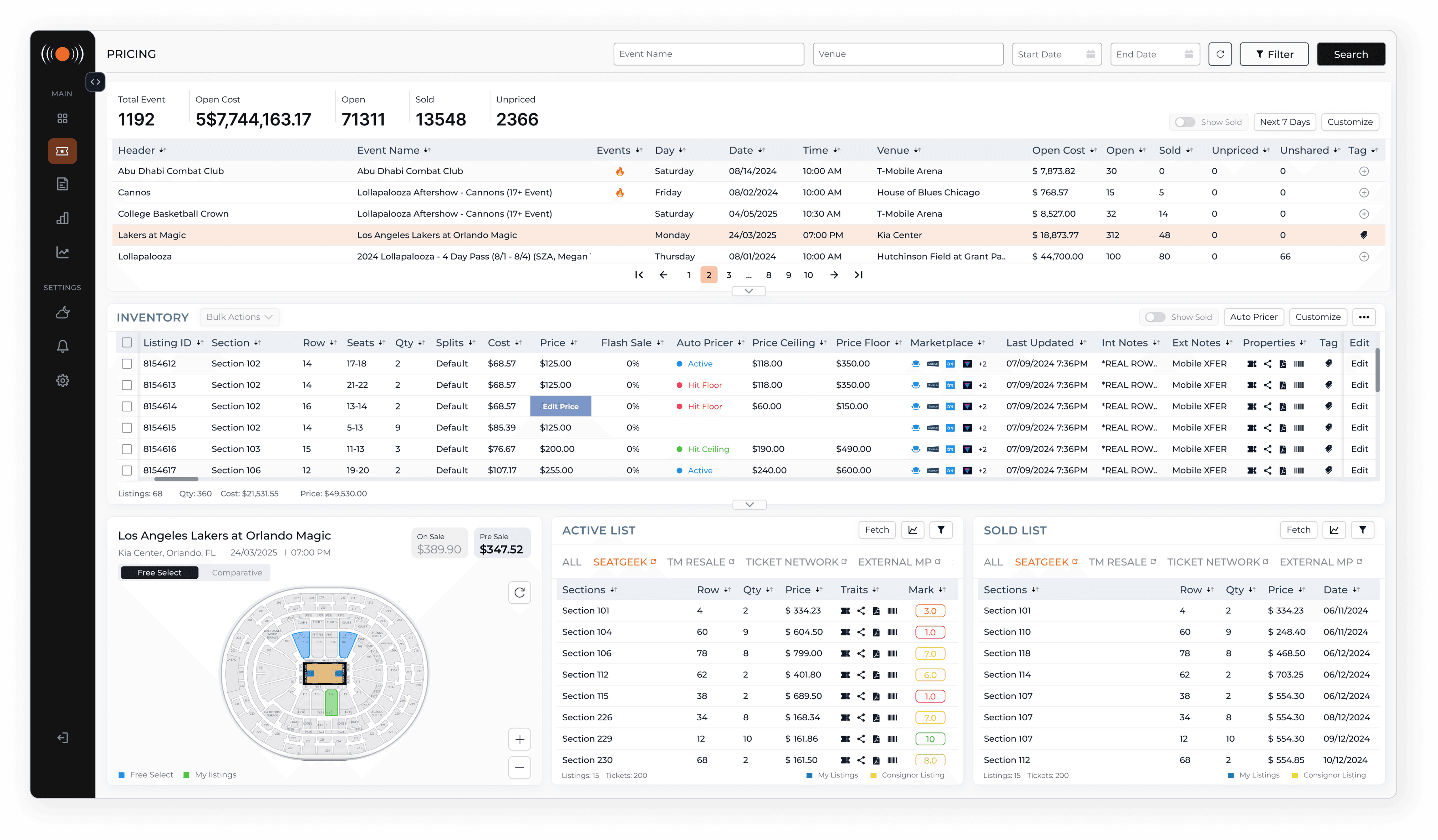
I restructured the entire page into three deliberate rows, each with a single job. Event selection at the top. Inventory management in the middle, duplicates removed, primary actions like Bulk Actions and Autopricer surfaced in the table header, and an Edit button on every row replacing hidden right-click interactions.
At the bottom, a single tabbed table became three parallel components: a map view, an active listings panel, and a sold listings panel.
The map was a new feature, brokers had no way to visualize competitive position spatially. Both listing panels are filterable by marketplace and include a chart view. The chart view existed before but had never worked. We made it work.
Listing Management
Editing a listing originally meant right-clicking, navigating a 25+ option context menu, and working through pop-ups inside pop-ups.
No hierarchy, no clarity.
When a broker clicks Edit, the workspace transitions into a dedicated inline editing environment, no modals, no lost context.
Actions are organized into two tabs:
Basic Info for everyday tasks
Advance for scheduled pricing and flash sales.
The older brokers who were initially most resistant came around fastest on this feature.
Autopricer
Autopricer could automatically adjust pricing based on market comparables, price floors, and ceilings. Most brokers either didn't know it existed or had given up on it, access required four to five steps buried in nested right-click submenus.
For brokers who haven't set it up yet, a single button: Open Autopricer, takes them into the full configuration flow, where they can set pricing rules, define price floors and ceilings, select sections using an integrated map, and see a live comparison between their current price and the new proposed price before applying.
The design handles both single listing and grouped Autopricer from the same entry point, with the interface adapting based on what the broker has selected in the inventory table.
A feature that required institutional knowledge to find now has a front door.
Brokers who had never used Autopricer could discover and configure it in a single session.
The redesign surfaced Autopricer as a primary action. I added a clear Autopricer CTA directly in the inventory header, always visible, one click away. Clicking it opens a Quick Actions panel on the right side of the screen.
For brokers who already have Autopricer configured, this panel shows their current settings and lets them make immediate adjustments without leaving the workspace.
(06)
Validation & Release
The redesigned interface was introduced at WTC Nashville, in front of active brokers who knew the platform deeply. Real users, real feedback, immediate. That exposure shaped refinements before broader release.
A controlled beta with 20 pilot brokers followed. Workflows were observed in actual daily use, not test conditions. The older brokers who had been most resistant to change were among the most telling validators, their comfort with the new interface by the end of beta was a stronger signal than any usability score.
(07)
Outcome
Autopricer adoption
Increased significantly among brokers who had never used the feature, becoming discoverable and configured within a single session for the first time.
Core task time reduced by ~60%
Pricing and listing management workflows that previously required multiple steps and nested popups now complete in a single structured environment, measured via Hotjar and Mixpanel.
Platform engagement up ~15%
Tracked in the first 6 months following beta rollout, among a user base that was actively resistant to change.
Design system established
A shared component library reduced UI inconsistency and accelerated feature development across subsequent releases.
These constraints weren't obstacles. They were the design brief.
Modernizing a legacy
B2B broker platform operating at $300M+GMV
Role
Sole Product Designer
Team
1 Designer; 2 Engineers; no PM
Duration
Apr 2024 - Dec 2024
Modernizing a legacy
B2B broker platform operating at $300M+GMV
Role
Sole Product Designer
Team
1 Designer; 2 Engineers; no PM
Duration
Apr 2024 - Dec 2024
(01)
Overview
Stage Front Portal is a live operational platform used by ticket brokers across the U.S. to manage inventory, pricing, and marketplace distribution, processing $300M+ GMV annually. Originally built in 2011 it had grown over two decades into a system of 120+ features that brokers depended on daily to make fast, high-stakes pricing decisions.
When I joined the project, the platform worked, but it was slowing brokers down in a market where speed is money. My job was to modernize it without breaking the workflows that experienced brokers had built
their businesses around.
(02)
Problem
The platform had evolved for over a decade without structural redesign. Through broker interviews and workflow mapping, several patterns emerged: fragmented workflows, duplicate inventory views, and hidden interactions that kept powerful features undiscovered.
The Autopricer, the platform's most valuable time-saving tool, had such low visibility that some brokers didn't know it existed despite years of daily use. In a market where pricing decisions happen in real time, these weren't just usability issues. They were directly impacting broker revenue.
(04)
Approach
From the beginning I made a deliberate choice: this wouldn't be a UI refresh. The real issue was that the platform had no hierarchy, everything was equally visible, which meant nothing was truly findable.
Broker interviews confirmed this immediately. Watching brokers use the right-click context menu was the turning point, it had 25+ options, but brokers used only a handful. Not because the others weren't valuable, but because there was no way to know what was important versus situational versus rarely needed. The job was to create hierarchy where none existed.
The conference deadline forced a hard prioritization call. With three user groups and three months, I focused entirely on brokers, the primary revenue driver. Showing one complete, polished core flow for the people who mattered most to the business was the right call.
Everything else was sequenced, not cut.
(05)
Key Improvements:
Main workspace redesign
The pricing page is where brokers live, scanning inventory, adjusting prices, responding to market changes in real time. The original design had no spatial hierarchy: key metrics buried in footers, a single cluttered table mixing active listings, sold listings, and market data together.
I restructured the entire page into three deliberate rows, each with a single job. Event selection at the top. Inventory management in the middle, duplicates removed, primary actions like Bulk Actions and Autopricer surfaced in the table header, and an Edit button on every row replacing hidden right-click interactions.
At the bottom, a single tabbed table became three parallel components: a map view, an active listings panel, and a sold listings panel.
The map was a new feature, brokers had no way to visualize competitive position spatially. Both listing panels are filterable by marketplace and include a chart view. The chart view existed before but had never worked. We made it work.
Listing Management
Editing a listing originally meant right-clicking, navigating a 25+ option context menu, and working through pop-ups inside pop-ups. No hierarchy, no clarity.
When a broker clicks Edit, the workspace transitions into a dedicated inline editing environment, no modals, no lost context.
Actions are organized into two tabs:
Basic Info for everyday tasks
Advance for scheduled pricing and flash sales.
The older brokers who were initially most resistant came around fastest on this feature.
Autopricer
Autopricer could automatically adjust pricing based on market comparables, price floors, and ceilings. Most brokers either didn't know it existed or had given up on it, access required four to five steps buried in nested right-click submenus.
For brokers who haven't set it up yet, a single button: Open Autopricer, takes them into the full configuration flow, where they can set pricing rules, define price floors and ceilings, select sections using an integrated map, and see a live comparison between their current price and the new proposed price before applying.
The design handles both single listing and grouped Autopricer from the same entry point, with the interface adapting based on what the broker has selected in the inventory table.
A feature that required institutional knowledge to find now has a front door. Brokers who had never used Autopricer could discover and configure it in a single session.
The redesign surfaced Autopricer as a primary action. I added a clear Autopricer CTA directly in the inventory header, always visible, one click away. Clicking it opens a Quick Actions panel on the right side of the screen.
For brokers who already have Autopricer configured, this panel shows their current settings and lets them make immediate adjustments without leaving the workspace.
(06)
Validation & Release
The redesigned interface was introduced at WTC Nashville, in front of active brokers who knew the platform deeply. Real users, real feedback, immediate. That exposure shaped refinements before broader release.
A controlled beta with 20 pilot brokers followed. Workflows were observed in actual daily use, not test conditions. The older brokers who had been most resistant to change were among the most telling validators, their comfort with the new interface by the end of beta was a stronger signal than any usability score.
(03)
Constraints
Backend could not be touched
All workflow improvements had to remain compatible with existing system logic. No structural changes, no new data models.
Live platform, no safety net
Brokers were managing real transactions at significant daily volume. Any change carried direct operational risk.
Minimal team, full ownership
For the first six months, just me and two developers. No PM, no researcher.
Hard conference deadline
Within three months we needed something ready for WTC Nashville, in front of active brokers who knew the product deeply.
These constraints weren't obstacles.
They were the design brief.
(07)
Outcome
Autopricer adoption
Increased significantly among brokers who had never used the feature, becoming discoverable and configured within a single session for the first time.
Core task time reduced by ~60%
Pricing and listing management workflows that previously required multiple steps and nested popups now complete in a single structured environment, measured via Hotjar and Mixpanel.
Platform engagement up ~15%
Tracked in the first 6 months following beta rollout, among a user base that was actively resistant to change.
Design system established
A shared component library reduced UI inconsistency and accelerated feature development across subsequent releases.
The redesign improved operational clarity across a highly complex broker platform while preserving workflows users had relied on for years.
View My Work
Ticketing
Multi Session Browser
Ticketing
Stage Front Portal
Retail Technology
Fuel Retail & POS Platform
Ticketing
Chrome Extension
Fintech
GenEQTY - mobile app
Non-Profit
UNICEF - Volunteering Platform
Sports and Entertainment
024 Boxing Com
View My Work
Ticketing
Multi Session Browser
Ticketing
Stage Front Portal
Retail Technology
Fuel Retail & POS Platform
Ticketing
Chrome Extension
Fintech
GenEQTY - mobile app
Non-Profit
UNICEF - Volunteering Platform
Sports and Entertainment
024 Boxing Com